
Have you ever wanted to transform your Roblox avatar into a stunning animatronic creation in Dress to Impress? The DTI game has evolved beyond basic fashion challenges, now embracing futuristic and mechanical aesthetics that perfectly suit animatronic-inspired looks. With recent updates introducing cyberpunk elements, mechanical accessories, and dystopian styles, players have more options than ever to craft robotic personas that dominate the fashion arena.
In the competitive world of DTI, understanding theme interpretation is crucial. Animatronics-themed outfits require a blend of mechanical elements, futuristic styling, and creative layering to stand out from the crowd. As professional DTI player @RobloxFashionGuru states: “The key to winning with niche themes like animatronics is balancing the literal interpretation with wearable fashion. You want judges to immediately recognize your concept while still appreciating the cohesive outfit.”

Whether you’re preparing for a specific animatronics-themed competition or want to expand your DTI repertoire, these 14 outfit ideas leverage both free and VIP items to help you dominate the game. Let’s dive into the mechanical magic that will transform your avatar into the ultimate Roblox animatronic sensation!
1. Cybernetic Revolution
Step into the future with this complete cybernetic makeover that perfectly captures the animatronic essence. Start with the Cyberpunk Body Suit (VIP exclusive) which gives you that hollow core appearance with an exposed mechanical spine. Pair this with metallic accessories, glowing limb attachments, and a futuristic face accessory from the Petal Update. The beauty of this outfit is how the mechanical elements integrate seamlessly with your avatar’s form.
“The Cyberpunk Body Suit changed the game for mechanical-themed outfits. It’s not just clothing—it’s your avatar’s anatomy.” — DTI competitive player @TechFashionQueen
| Item | Location | Color/Pattern |
|---|---|---|
| Cyberpunk Body Suit | VIP room | Silver/gray metallic |
| Mechanical Limb Attachments | VIP handheld section | Chrome |
| Glowing Eye Contacts | Makeup chair | Electric blue |
| Robot Face | VIP head accessories | Matte black |

Pro Tip: For maximum impact, use the pattern feature to add subtle circuit board designs to your accessories. The Petal Update introduced neon green patterns that work perfectly for highlighting your animatronic’s “energy flow” points!
2. Steampunk Animatronic
Embrace vintage robotics with this brass-and-gear-inspired masterpiece. The Steampunk Animatronic look combines Victorian elegance with mechanical ingenuity. Using the Long Striped Jacket with Belt from the Brat Update as your foundation piece, layer with brass-colored accessories, functional-looking gauges, and cogwheel decorations. Complete the look with copper-toned leg warmers and fingerless gloves.
This outfit works particularly well because it transforms the Brat Update’s basic clothing into something entirely different through strategic color choices and accessory layering. The key is to create the illusion that your avatar is literally constructed of gears and pipes while maintaining fashion-forward appeal.
| Essential Pieces |
|---|
| Long Striped Jacket with Belt |
| Brass-colored leg warmers |
| Functional pocket watch accessory |
| Goggle headpiece |
| Copper-toned gloves |

Pro Tip: In DTI, steampunk elements often go overlooked in favor of sleeker cyberpunk designs. By combining both aesthetics in one outfit, you create a unique interpretation of animatronics that stands out in competitions.
3. Factory Worker Animatronic
Inspired by industrial assembly lines, this outfit channels the hardworking robots of manufacturing plants. Begin with the Denim Lace Skirt and Cut-Out Tank Top from the Brat Update, then modify them to look industrial with metallic patterns and safety orange accents. Add the Leg Garters as belt replacements with tool attachments and incorporate the Top-Rimmed Sunglasses for that functional worker aesthetic.
The Factory Worker Animatronic outfit excels in DTI because it takes everyday clothing and transforms it into something thematic with minimal changes. Understanding how to repurpose standard DTI items is crucial for creating compelling animatronic looks without relying solely on niche accessories.
“The best DTI players don’t just wear clothing—they tell stories through their outfits.” — Pro Game Guides
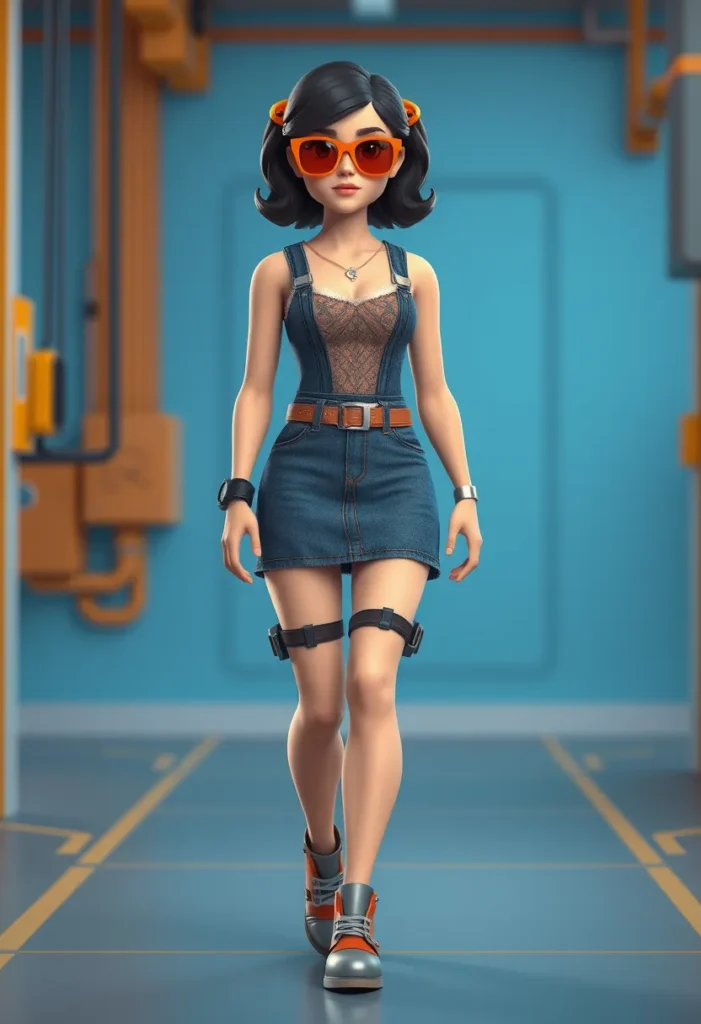
Pro Tip: Use orange and yellow color combinations to represent “working” animatronics versus blue tones for “inactive” units. Judges appreciate these subtle narrative touches that elevate your theme interpretation.
4. Glitch Effect Animatronic
Create the illusion of a malfunctioning robot with this innovative glitch-themed outfit. Utilize DTI’s pattern system to create fragmented, pixelated effects on solid clothing items. Start with a basic body suit and apply the Neon Green Zebra Pattern from the Brat Update in irregular sections to simulate visual distortion. Add mismatched accessories on either side of your avatar to enhance the “glitching” effect.
This outfit shines in DTI competitions because it uses the game mechanics (pattern application) to directly support your theme interpretation. Unlike static animatronic designs, the glitch effect suggests movement and transformation—qualities that impress DTI judges looking for dynamic presentations.
| Color Strategy | Application |
|---|---|
| Base clothing | Solid black |
| Glitch sections | Neon green patterns |
| Accent pieces | White with digital distortion effects |
| Skin tone | Pale gray with pixelated highlights |

Pro Tip: When creating glitch effects, avoid making the pattern too uniform. Authentic glitches are random—place your pattern sections asymmetrically for greater realism in the DTI game environment.
5. Spring-Loaded Animatronic
Inspired by mechanical toys and clockwork animation, this playful animatronic design features visible springs and winding mechanisms. Use the Floral Headdress from the Petal Update as a base, but modify its appearance with metallic colors to transform it into a winding key. Pair with leg warmers that have spring attachments and a jacket with visible coil details.
The Spring-Loaded Animatronic outfit demonstrates how DTI players can reinterpret seasonal items (like spring floral accessories) into mechanical components. This creative repurposing is essential for animatronic themes where dedicated robotic items might be limited.
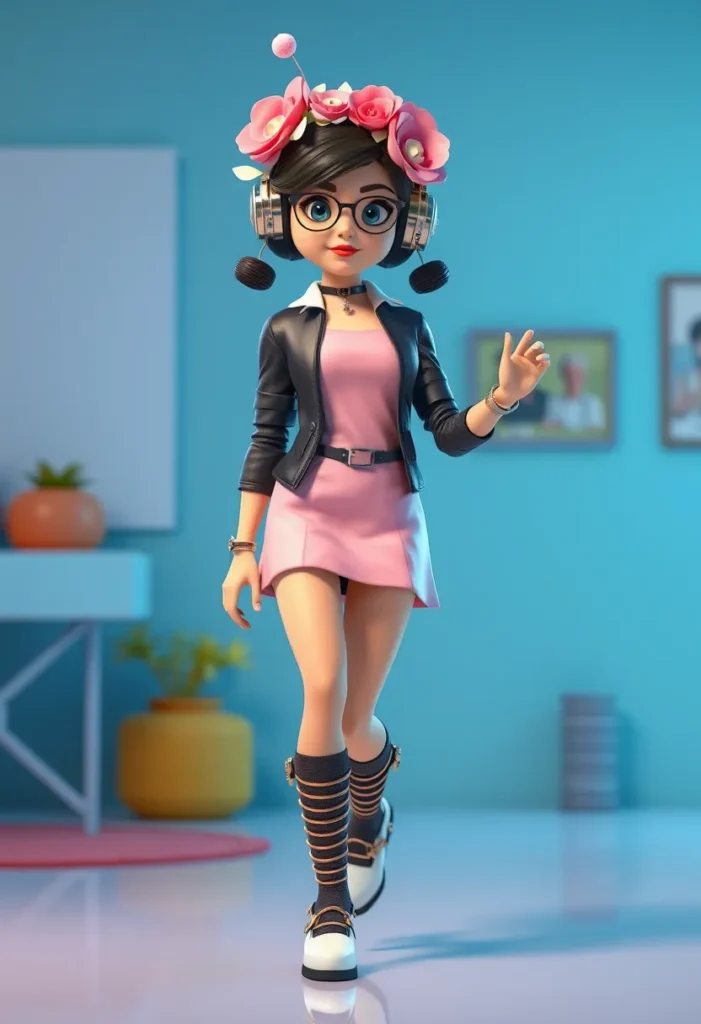
Pro Tip: When styling spring-themed animatronics, focus on movement. Position your avatar with one leg slightly raised as if mid-step, suggesting the coiled energy of a wound spring ready to release.
6. Dystopian Repair Drone
Drawing from the dystopian theme guides, this outfit imagines an animatronic designed for post-apocalyptic repair work. Start with the Military Dystopia base from standard DTI items: a camouflage fur jacket, dark camisole, and functional boots. Add mechanical arms as handheld accessories, tool belts with visible compartments, and protective goggles modified with HUD elements.
This combination works exceptionally well in DTI because it merges two popular themes (dystopian and technological) into a cohesive narrative. The repair drone concept tells a story of functionality within devastation—something judges consistently reward in competitive play.
| Repair Drone Essentials |
|---|
| Camouflage jacket (dystopian theme) |
| Mechanical limb attachments |
| Tool belt with visible compartments |
| Protective face mask with HUD |
| Functional gloves with finger sensors |
“In DTI, the most memorable outfits aren’t just visually striking—they make you wonder about the character’s story.” — TheGamer DTI Guide

Pro Tip: Add a subtle touch of “damage” to your animatronic with ripped elements or mismatched parts. In the DTI game, these imperfections often make your theme interpretation feel more authentic and lived-in.
7. Elegant Clockwork Maiden
Transform mechanical elements into high fashion with this sophisticated clockwork design. Using the Long Wavy Hair options and elegant dresses from the DTI catalog, incorporate visible gears, metallic embroidery, and delicate chain accessories. The Fluffy Crop Jacket from the Brat Update serves as an excellent base when modified with metallic patterns.
This outfit excels in DTI competitions because it demonstrates how animatronic themes don’t have to be bulky or industrial—they can be graceful and refined while still maintaining mechanical authenticity. The key is balancing delicacy with mechanical elements.

Pro Tip: Use silver and gold color schemes to create an elegant contrast between the mechanical and organic elements of your DTI avatar. This sophisticated palette works particularly well for formal animatronic interpretations.
8. Neon Circuit Animatronic
Channel the vibrant energy of circuit boards with this glowing animatronic design. Utilize DTI’s pattern system to create circuit-like designs across your avatar’s body. Start with a black base outfit and apply the Neon Green Cheetah Pattern from the Brat Update in strategic locations to mimic electronic pathways.
The Neon Circuit Animatronic stands out in DTI because it uses the game’s pattern feature creatively to build thematic continuity. Unlike outfits that rely solely on accessories, this design integrates the theme into the very fabric of your avatar’s appearance.
| Circuit Design Strategy |
|---|
| Base layer: Black clothing |
| Primary circuits: Neon green patterns |
| Secondary connections: Blue patterns |
| Power sources: Yellow or white accents |
| Articulation points: Red highlight sections |

Pro Tip: For a more authentic circuit board appearance, create “connection points” at joints (wrists, elbows, knees) where your circuit patterns converge—this mimics how real animatronics would distribute power.
9. Withered Rose Automaton
Combine mechanical and organic elements with this unique animatronic interpretation. Take inspiration from the Withered Rose Dress set (available for $5,200 in-game currency) and transform it into a mechanical floral creation. Use darker rose colors with metallic accents to suggest an animatronic designed to tend gardens.
This outfit demonstrates DTI’s strength in allowing players to blend seemingly disparate themes (botanical and mechanical) into cohesive narratives. The judges often reward creative connections between unexpected elements.
“The best DTI players see beyond the surface theme—they understand the story behind the clothing.” — Roblox DTI Community Guide

Pro Tip: Add subtle movement suggestions to your pose—slightly bent fingers as if manipulating small objects, or a head tilt suggesting auditory processing. These details enhance your animatronic narrative.
10. Retro Arcade Animatronic
Pay homage to classic video game aesthetics with this pixel-inspired animatronic design. Use DTI’s limited palette options to create a deliberately low-resolution appearance. Start with basic clothing items and modify them with blocky patterns that suggest 8-bit graphics.
This outfit works well in DTI because it leverages the game’s inherent limitations as part of the theme—not as constraints but as creative opportunities. The Retro Arcade Animatronic proves that sometimes less is more when creating compelling thematic interpretations.

Pro Tip: When creating pixel-art animatronics, focus on strategic placement of your “low-res” elements. Key areas like hands, face, and joints should show the most pronounced pixelation for maximum thematic impact.
11. Grunge Animatronic
Rebel against sleek robotic perfection with this deliberately imperfect Grunge Animatronic. Use the Grunge Collection from the Petal Update ($6,000 in-game) as your foundation, but modify it with metallic textures and visible wiring beneath the distressed fabric.
This outfit shines in DTI competitions because it challenges conventional expectations of what animatronics should look like—sometimes broken is beautiful. The grunge aesthetic suggests a mechanical being that’s been through battles or hard work.
| Grunge Animatronic Elements |
|---|
| Distressed fabric showing mechanical understructure |
| Mismatched mechanical accessories |
| Visible “wiring” through ripped sections |
| Dull metal tones instead of polished chrome |
| Functional damage with practical repairs |

Pro Tip: In DTI, don’t be afraid to show “imperfections” in your animatronic design. Scars, dents, and makeshift repairs often tell a more compelling story than pristine mechanical perfection.
12. Military Tactical Animatronic
Draw inspiration from combat robotics with this formidable Military Tactical Animatronic. Utilize the Fighting Dystopia armor set from VIP items, but customize it with additional tactical accessories and enhanced protection elements. The camouflage green and brown color scheme works perfectly for a field-ready animatronic.
This outfit demonstrates DTI mastery through strategic layering—combining multiple armor pieces while maintaining visual coherence. Military themes consistently perform well in DTI competitions when executed with attention to authentic details.
“Understanding where items are located in DTI is 50% of the battle—you need to build your outfit quickly when themes are announced.” — Competitive DTI player

Pro Tip: Focus on functional details that suggest your animatronic’s purpose—communication devices, targeting systems, or weapon mounts. These narrative elements elevate your outfit beyond mere aesthetics.
13. Ice Core Animatronic
Blend mechanical elements with cryogenic technology using the Ice Age theme as your foundation. Modify the Ice Queen outfit with visible cooling systems, frost-covered mechanical joints, and blue-tinted circuitry that suggests ice-core technology.
This creative adaptation demonstrates how DTI players can cross-pollinate themes for unique interpretations. The Ice Core Animatronic works because it presents a logical reason for an animatronic to incorporate cold elements—thermal regulation or specific environmental adaptation.
| Ice Core Elements |
|---|
| Frost-covered joints |
| Blue-tinted “coolant” patterns |
| Shattered ice texture on mechanical surfaces |
| Breath vapor effect (via hand positioning) |
| Frost-rimmed optical sensors |

Pro Tip: Use DTI’s pattern system to create “frost” effects on metallic surfaces. Alternate between light blue and white patterns in layered applications for realistic ice buildup.
14. Hoofed Animatronic
Take inspiration from the Hoof Shoes introduced in the Petal Update to create an animal-inspired animatronic. This unique concept blends organic creature design with mechanical functionality, featuring arm attachments that coordinate with the hoof accessories.
The Hoofed Animatronic stands out in DTI because it challenges conventional notions of what animatronics should look like—sometimes the most innovative designs come from unexpected combinations of DTI’s clothing system.

Pro Tip: When creating animal-inspired animatronics, focus on the mechanical aspects of movement—how joints would work, where artificial muscles would attach, and how the creature’s natural movements would translate to mechanical function.
Maximizing Your Animatronic Outfits in DTI
Creating compelling animatronic outfits in Dress to Impress requires more than just assembling mechanical-looking items. The most successful DTI players understand that theme interpretation is paramount—your outfit must clearly communicate “animatronic” while maintaining fashion sensibility. Study the 179 official DTI themes mentioned in Pro Game Guides’ comprehensive guide to understand how judges evaluate thematic relevance.
Remember that the DTI game rewards creativity within constraints. You don’t need every perfect item to create a winning animatronic outfit—sometimes a single well-placed mechanical detail combined with thoughtful color choices makes all the difference. The recent Petal and Brat updates have expanded DTI’s creative possibilities significantly, giving players more tools than ever to express animatronic concepts.
As you experiment with these 14 animatronic outfit ideas, don’t be afraid to mix elements between concepts. The true magic of Roblox’s DTI happens when players take inspiration and make it their own. Whether you’re competing in official events or just expressing your creativity, these animatronic-inspired designs will help your avatar stand out in the ever-evolving world of Dress to Impress fashion.
